


Views: 0 Author: Site Editor Publish Time: 2026-08-17 Origin: Site


For hardware engineers and system integrators, selecting the wrong embedded printing solution leads to field failures. Paper jams and excessive maintenance headaches plague poorly designed systems. Designing a custom enclosure around an incompatible printer mechanism wastes valuable engineering time. Your hardware choices dictate the long-term reliability of the entire machine.
Both panel printer modules and kiosk machines operate in unattended or semi-attended environments. However, they serve fundamentally different business cases. Their mechanical footprints and paper handling capabilities diverge significantly. A medical device needs different specifications compared to an outdoor parking meter.
This guide breaks down the technical and operational differences between these form factors. You will learn how to evaluate capacity and handle integration risks. We provide a framework to specify the exact hardware for your equipment. Ultimately, these insights help you build robust embedded systems.
Integration Style: A panel printer mounts flush to the exterior of an enclosure, while a KIOSK Printer is mounted internally behind a fascia or chassis.
Paper Capacity: Kiosk printers support massive paper rolls (up to 250mm diameter) for high-traffic autonomy; panel printers rely on compact, easily accessible drop-in rolls.
Paper Handling: True kiosk receipt printers utilize presenters and retractors to prevent vandalism and user-induced jams, features typically absent in panel printers.
Primary Use Cases: Panel printers dominate medical devices, industrial testing equipment, and weigh scales. Kiosk printers dominate ATMs, self-checkout stands, and ticketing machines.
Engineers must evaluate enclosure limitations before selecting a print mechanism. The mounting approach heavily influences your chassis design. Hardware teams often overlook print modules until the final stages of prototyping. This delay forces awkward spatial compromises.
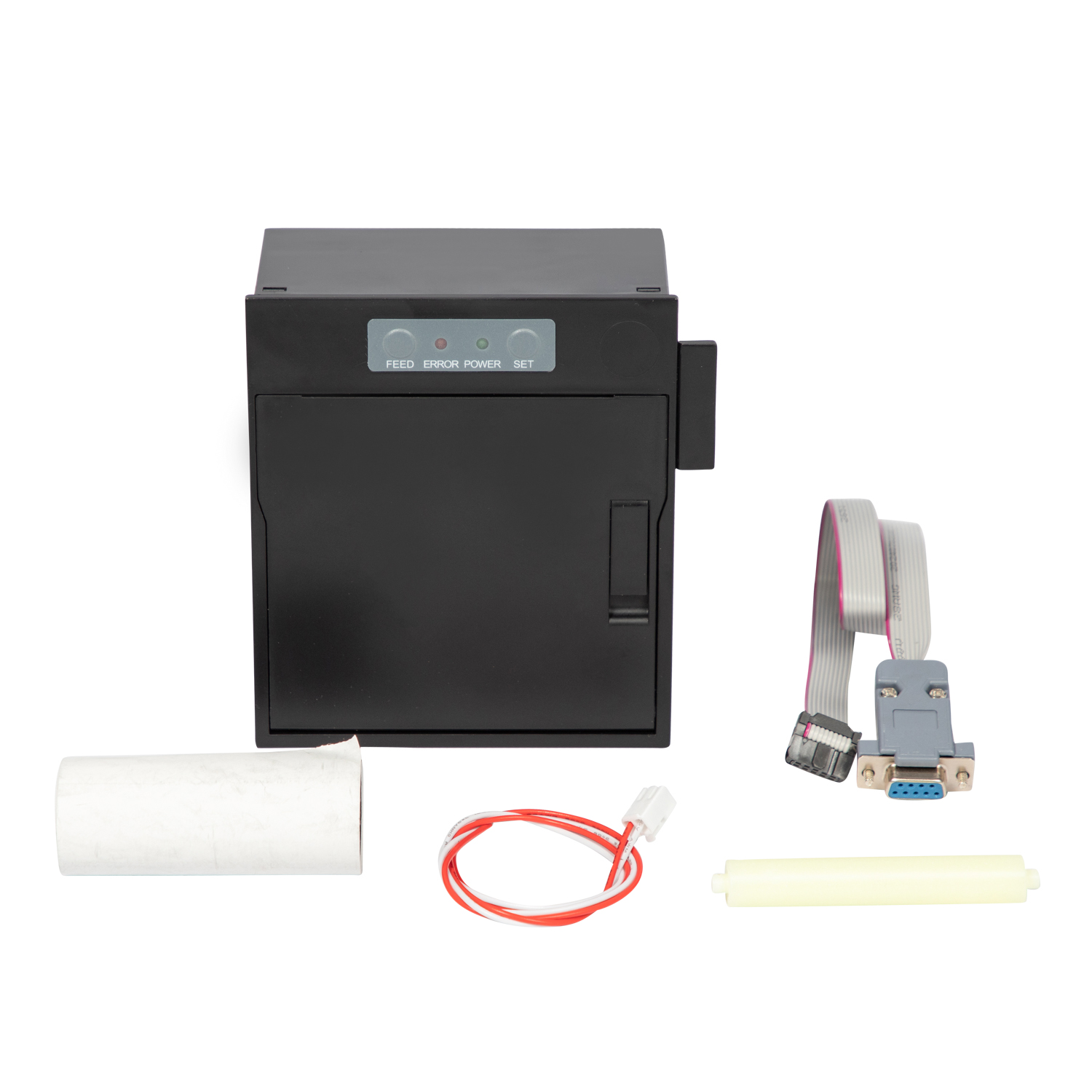
Manufacturers design these compact units for front-panel flush mounting. You only need a simple rectangular cutout on the equipment casing. Installers secure the unit using integrated side brackets or locking tabs. The front bezel sits neatly on the exterior surface, often providing a clean, finished look.
This approach presents a strict engineering constraint. You are limited to a very shallow internal depth. Most modules intrude no more than 40mm to 60mm into the chassis. The design prioritizes ultra-compact spatial efficiency. It works perfectly for slim medical analyzers, rack-mounted servers, or handheld diagnostic tools.
Best Practice: When designing the cutout, adhere strictly to the manufacturer's mechanical drawings. Even a one-millimeter deviation can prevent the locking tabs from engaging properly.
These robust units require internal chassis mounting. They sit entirely behind the main enclosure wall. You must design and fabricate structural metal brackets inside the terminal. Users only interact directly via the external paper exit slot or a customized plastic bezel.
This brings completely different engineering constraints. You must carefully plan the three-dimensional layout. Engineers need to align the printer mechanism, the roll holder arm, and the paper path simultaneously.
To successfully integrate a KIOSK Printer, follow these structural planning steps:
Calculate the maximum diameter of the paper roll to ensure cabinet clearance.
Determine the physical sweep area required for the spring-loaded tension arm.
Align the internal cutter chute precisely over the external exit bezel.
Route data and power cables away from the internal stepper motors to prevent electromagnetic interference (EMI).
Common Mistake: Failing to account for the swinging arc of the paper roll tension arm. If the arm hits an internal power supply during operation, it causes immediate paper slack and jams.
Unattended public environments invite unpredictable human behavior. Users frequently pull on receipts before the printing cycle finishes. You must design hardware to mitigate human interference actively. Mechanical safeguards protect both the user data and the hardware.
A true KIOSK Receipt Printer uses advanced "looping" technology. The mechanism feeds printed paper into a secure internal cavity. It forms a temporary loop of paper inside the machine. The heavy-duty cutter severs the receipt internally first. Only after the cut is complete does the presenter motor push the document out through the front slot.
This sequence completely prevents users from tearing the paper prematurely. Pulling on the paper cannot damage the delicate thermal printhead or the platen roller. Furthermore, automated retractors pull uncollected sensitive documents back into a secure internal bin. ATMs rely heavily on this retraction feature. If a user forgets a bank balance slip, the machine pulls it inward after thirty seconds to protect customer privacy.
These compact units employ a straightforward direct-exit mechanism. Most utilize a highly efficient clamshell door design. They entirely lack complex presenters or retraction bins. Users simply take the paper directly as it emerges from the print head.
This structural simplicity benefits attended environments. B2B equipment faces very low vandalism threats. An operator testing industrial components will not aggressively rip the paper. The clamshell design houses the rubber platen roller directly inside the access door. When the door opens, the paper path is completely exposed, allowing instant jam clearance.
Machine autonomy dictates your long-term maintenance schedule. High-traffic machines must run for weeks without technician intervention. Understanding media capacity prevents operational bottlenecks.
A standard Panel Printer module usually restricts you to 30mm or 50mm diameter rolls. The integrated plastic housing physically prevents larger media usage. A typical 50mm roll might hold around 15 meters of thermal paper. Operators must perform frequent paper changes. This remains acceptable in a laboratory but fails in a busy train station.
Conversely, internal kiosk units accommodate entirely separate paper roll holders. Engineers often specify roll diameters up to 150mm or even 250mm. A 250mm roll holds hundreds of meters of thick paper stock. This massive capacity suits high-volume retail environments perfectly. It drastically minimizes necessary technician visits and maximizes terminal uptime.
However, massive rolls introduce new physics. The dead weight of a huge paper roll requires strong tension arms. Some systems employ secondary feed motors to unroll heavy paper smoothly without stalling the main printhead stepper motor.
Access methods define the daily operational experience. Panel modules offer incredibly easy front-facing paper loading. The drop-in clamshell design proves ideal for end-users, nurses, or lab technicians. They require no special tools, keys, or technical training. You pull a latch, drop in a new roll, and snap it closed.
Kiosk designs require unlocking the heavy terminal cabinet. Technicians must swap paper from the rear or side panels. The paper path often requires manual threading through a tension bar and into the presenter chute. These systems target trained service personnel rather than casual users.
Table 1: Capacity and Maintenance Comparison
Feature | Compact Panel Modules | Internal Kiosk Modules |
|---|---|---|
Maximum Roll Diameter | 30mm – 50mm | 150mm – 250mm |
Paper Loading Method | Front-facing, drop-in clamshell | Internal access, manual threading |
Ideal Operator | End-users, nurses, clinical staff | Trained service technicians |
Typical Autonomy | Low (Requires frequent daily changes) | High (Extended unattended use) |
Space Requirement | Minimal (Flush mount) | Extensive (Requires deep chassis) |
The 80mm paper width dominates the global printing market. It serves as the absolute standard for retail receipts, banking logs, and ticketing applications. The ESC/POS command language defaults perfectly to formatting 42 or 48 characters per line on this width.
An 80mm Panel Printer delivers standard receipt widths in a remarkably tight package. We recommend them for industrial control panels and gas station pumps. High-end medical analyzers also benefit from the wider print area. They fit scenarios requiring full-width text formatting while possessing strict spatial limitations on the door or chassis.
The primary trade-off involves physical roll capacity. You gain the industry-standard print width but sacrifice media longevity. Staff must replenish the media frequently. However, for a sophisticated weigh scale printing heavy logistics data, the wide format is non-negotiable.
An 80mm KIOSK Printer handles brutal daily workloads. We specify these for self-service retail checkouts. Parking pay stations and lottery machines rely heavily on them. They process thousands of transactions daily.
The trade-off here is absolute chassis size. Your design requires a large internal footprint to house the motor, cutter, presenter, and massive paper spool. However, it delivers exceptional high-speed printing. Many mechanisms achieve speeds up to 250mm/s or higher. This high velocity ensures incredibly fast transactions. It drastically reduces queuing times in busy retail environments.
Hardware selection requires matching technical specifications to physical environments. Use this strategic framework to guide your architectural decisions.
The equipment is primarily operated by trained staff, not the general public.
Your internal cabinet space is severely restricted (less than 60mm depth available).
Your daily paper volume remains consistently low (fewer than 50 receipts per day).
You require IP65-rated front faces for splash and dust resistance.
Instant, toolless paper reloading is a strict requirement for your operators.
Your terminal operates unmonitored in a high-traffic public space.
Your expected print volume reaches hundreds of receipts per day.
Your application requires strict document security (utilizing retract and retain features).
You plan on printing on thick stock like boarding passes, event tickets, or lottery slips.
Your enclosure design can accommodate a deep internal footprint and heavy mounting brackets.
Hardware deployment involves overcoming hidden operational challenges. Ignoring these engineering realities causes long-term system unreliability. A poorly integrated printer module leads to constant downtime.
High-traffic scenarios quickly expose the limitations of small media rolls. Staff must constantly monitor and replenish small paper supplies. This frequent physical intervention disrupts normal operational workflows. A busy hospital laboratory cannot afford analyzer downtime simply because a tiny receipt roll depleted. Engineers must accurately model daily transaction volumes to ensure they do not overburden staff with constant reloading tasks.
Internal mounting demands precise mechanical engineering. Misalignment between the internal paper chute and the external bezel guarantees field jams. Paper paths must remain perfectly unobstructed. Engineers must enforce tight mechanical tolerances during the prototyping phase. A deviation of just two millimeters causes catastrophic paper bunching inside the chassis. We highly recommend utilizing custom alignment brackets. Test the paper exit path using the thickest supported paper stock during your QA phase.
Component lifespan directly impacts machine uptime. Kiosk cutters utilize heavy-duty rotary motors. Manufacturers typically rate them for 1.5 to 2 million cuts. They easily slice through thick thermal paper daily without dulling. The thermal printheads generally boast lifespans exceeding 150 kilometers of printed paper.
Conversely, compact cutters face strict size constraints. Their internal motors and guillotine blades are smaller. Consequently, they often carry lower lifecycle ratings, sometimes hovering around 500,000 cuts. You must rigorously verify that the cutter specification matches your expected daily transaction volume. Deploying a light-duty mechanism in a heavy-duty environment guarantees premature mechanical failure.
Choosing the correct printing module requires deeply evaluating your deployment environment. The core dividing line comes down to Space and Simplicity versus Autonomy and Security. Compact front-mounted modules offer incredible spatial efficiency for staff-operated devices. Internal chassis models provide the rugged autonomy required for unmonitored, public-facing terminals.
Before finalizing your chassis design, take a crucial next step. Accurately evaluate your required paper roll diameter and daily print volume. Prototyping around the wrong physical dimensions causes severe engineering delays and costly tooling changes.
Contact our engineering support team today. We can provide detailed mechanical drawings and STEP files for your CAD software. Request an evaluation unit to ensure perfect mechanical integration for your next embedded prototype.
A: Yes, it can operate outdoors if properly protected. You must equip it with a UV-resistant, IP-rated front bezel. This prevents water and dust ingress. Additionally, you must verify the operating temperature ratings of the specific mechanism. Cold climates often require internal chassis heaters to prevent thermal head failure.
A: A presenter is a specialized staging mechanism. It holds the printed ticket internally within a loop space. The printer fully cuts the paper before pushing it out to the user. This sequence prevents impatient users from pulling the paper. It effectively eliminates paper jams and protects the delicate thermal head from physical damage.
A: No, they do not require complex, proprietary drivers. Standard panel and kiosk modules typically share the same universal command languages. Most utilize the widely supported ESC/POS command set. They also offer standard hardware interface options. You can easily connect them via USB, RS232, or TTL serial connections.


