


Views: 0 Author: Site Editor Publish Time: 2026-05-18 Origin: Site


Supermarket profit margins remain notoriously thin across the retail industry. Operational efficiency at the Point of Sale (POS) acts as a critical lifeline for store operations. Long checkout queues inevitably lead to cart abandonment. Customers quickly lose patience when forced to wait in stagnant lines. While software upgrades often grab the spotlight, physical POS hardware frequently causes hidden bottlenecks. Outdated receipt printing systems stall transactions and frustrate both cashiers and shoppers.
Upgrading to a modern 58mm Thermal Receipt Printer directly streamlines cashier workflows. You will discover how faster transaction times and optimized counter space eliminate queue friction. We will explore how phasing out ink dependencies enhances reliability during peak grocery hours. By the end of this guide, you will understand how specialized hardware upgrades transform your baseline checkout velocity.
Speed & Workflow: Thermal technology eliminates ink heating/application time, delivering millisecond-level printing (typically 70–120mm/s) to reduce queue wait times.
Space Optimization: A 58mm thermal receipt printer with built-in adapter removes cumbersome power bricks, freeing up critical counter real estate for scanners and bagging.
Cost Reduction: Phasing out ribbons and ink cartridges transitions printing from a recurring high-cost OPEX to a low-maintenance, paper-only model.
Reliability: Fewer moving mechanical parts result in significantly higher Mean Time Between Failures (MTBF), reducing mid-shift hardware breakdowns.
Retail managers often measure checkout efficiency in seconds. A five-second delay per transaction might seem negligible at first glance. However, those seconds compound aggressively during peak grocery hours. Imagine a Saturday afternoon rush. If a cashier processes two hundred customers, a five-second hardware delay adds nearly seventeen minutes of dead time to a single lane. Slow mechanical printing forces cashiers to pause. They stand idle. They wait for the machine to finish before handing over the receipt and moving to the next shopper. This mechanical delay builds queue friction.
Beyond slow printing speeds, consumable interruptions severely disrupt daily operations. Traditional mechanical printers require constant attention. Cashiers must halt their lanes completely to resolve these hardware issues. These interruptions create a poor experience for the waiting shopper.
Ink ribbon replacements: Cashiers struggle to thread new ribbons during busy shifts, often staining their hands.
Paper feed jams: Complex dot-matrix paper pathways frequently snag, requiring supervisors to unlock the machine.
Alignment errors: Multi-part paper rolls misalign, forcing staff to void and reprint the entire transaction.
Poor print quality introduces hidden risks long after the customer leaves the store. Traditional ribbons degrade over time. The ink fades as the ribbon dries out. This creates smudged, unreadable barcodes on the final receipt. When a customer returns to the supermarket for a refund, the POS scanner cannot read the faded barcode. The cashier must manually type a twelve-digit transaction code into the terminal. Manual entry inevitably leads to typos, further slowing down the customer service desk.
Direct thermal technology fundamentally changes how receipts generate text. Unlike traditional mechanical systems, thermal printers bypass ink transfer mechanisms entirely. The machine uses a specialized thermal printhead containing thousands of tiny heating elements. The supermarket uses chemically treated thermal paper. As the paper passes over the printhead, specific elements heat up instantly. This heat causes the chemical coating on the paper to turn black, forming crisp text and images. You never need to replace ink cartridges.
Print speed must align perfectly with human workflows. A baseline printing speed of 70mm to 120mm per second matches the natural rhythm of a cashier. By the time the cashier finishes scanning the final item and processes the payment, the receipt is already waiting. This millisecond-level printing ensures the hardware never dictates the pace of the employee. Express lanes benefit immensely from this synchronization. Shoppers utilizing self-checkout kiosks also experience zero friction.
Hardware designers created "drop-and-load" mechanics to solve the paper jam crisis. Cashiers no longer thread paper through tight plastic rollers. To change a roll, you simply pop open the top cover, drop the new paper roll into the basin, pull an inch of paper forward, and snap the lid shut. The entire process takes under five seconds. You practically eliminate paper jam troubleshooting on the spot.
High-resolution output guarantees data retention and clarity. Modern supermarkets rely heavily on loyalty applications and digital coupons. A thermal printhead produces sharp, smudge-proof barcodes and QR codes every single time. A customer can fold the receipt into their pocket, take it home, and scan the QR code using their smartphone weeks later. Sharp printing prevents the scanning failures common to older ink-based systems.
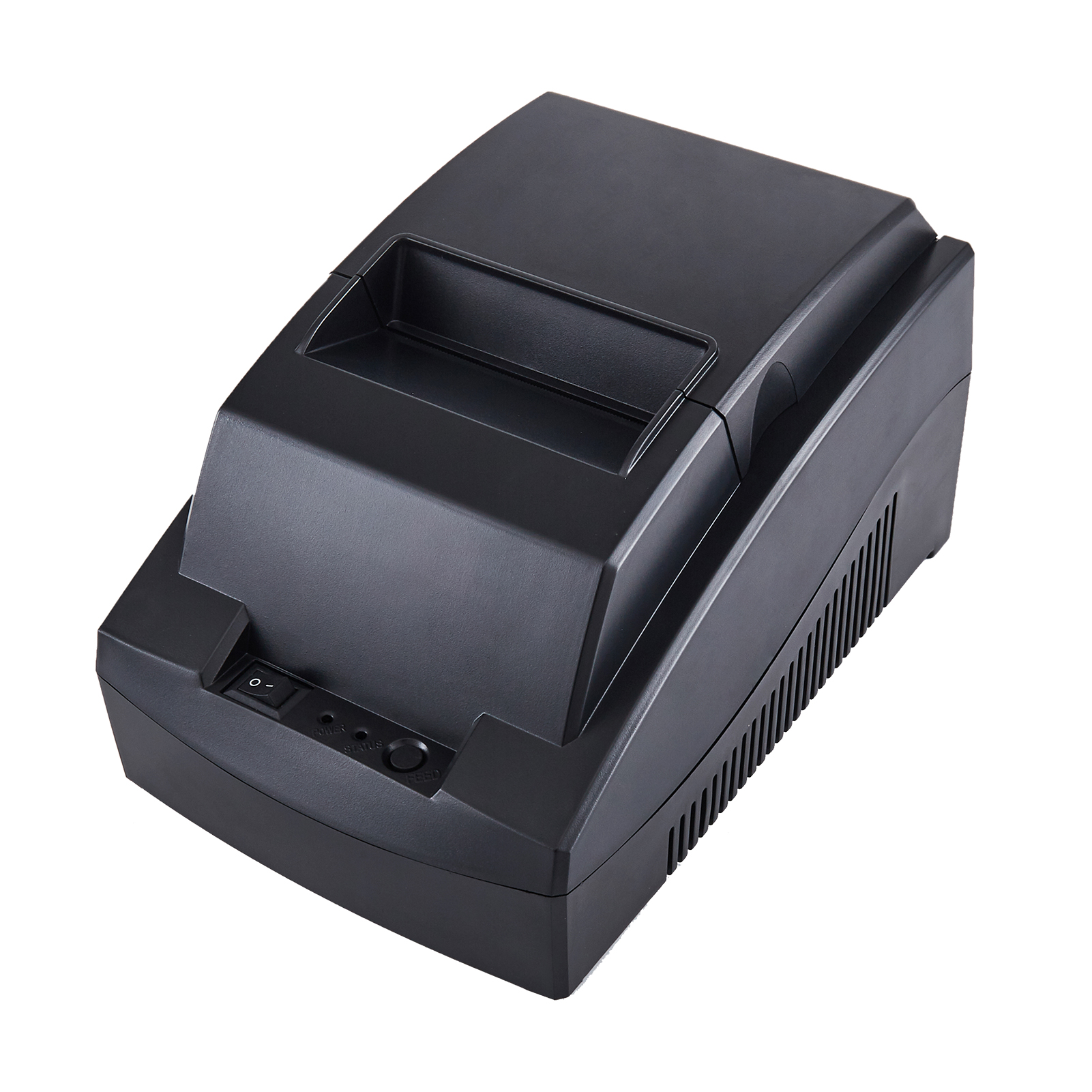
Supermarket POS stations face a severe "clutter-free" mandate. Real estate at the checkout counter remains incredibly scarce. Cashiers need space for bagging groceries. They need clear zones for barcode scanners, heavy produce scales, and card payment terminals. Furthermore, store managers want to utilize every square inch for high-margin impulse-buy displays. Bulky hardware directly violates this mandate.
Traditional POS printers utilize large, heavy external power bricks. These black boxes create massive headaches for store planners. You usually have to kick them under the desk or hide them behind the monitor. They trap thick layers of dust over time. They complicate cable routing when IT teams try to zip-tie cords neatly. More importantly, external adapters on the floor risk severe liquid damage from spilled beverages or leaking grocery items.
Integrating the power supply directly into the printer chassis solves these environmental hazards completely. A 58mm Thermal Receipt Printer with Built-In Adapter drastically improves your hardware footprint. Moving the power components inside the unit reduces external cable clutter by half. You only need a single standard power cord running to the wall outlet. This integrated design improves the physical stability of the device on a slippery desk. It also allows IT teams to execute clean under-counter mounting or side-shelf installations without worrying about a dangling power brick.
Transitioning to thermal technology shifts your fundamental maintenance strategy. You stop worrying about fragile mechanical arms and dry ink reservoirs. Instead, you focus purely on solid-state durability. Thermal systems rely on fewer moving parts. This simplicity directly translates to a drastically higher Mean Time Between Failures (MTBF). Supermarkets require hardware capable of surviving brutal daily usage without constant babysitting.
We must assess true mechanical durability by looking at two critical components: the thermal printhead and the cutting mechanism. A high-quality printhead easily achieves a lifespan of 50 to 100 kilometers of continuous printing. To put this in perspective, printing 50 kilometers of paper equates to generating hundreds of thousands of standard grocery receipts. Similarly, an industrial-grade auto-cutter mechanism routinely exceeds 1.5 million consecutive cuts before showing signs of dulling.
The lack of complex moving parts dramatically reduces IT helpdesk tickets. Store managers no longer need to call specialized on-site technicians to realign jammed ribbon gears. Routine maintenance drops to almost zero. Cashiers simply wipe the printhead with a specialized alcohol pen once a month to remove paper dust. This operational simplicity keeps lanes open.
Durability Metric | Traditional Dot-Matrix Printer | Modern Thermal Printer |
|---|---|---|
Moving Parts | High (Ribbons, gears, impact pins) | Low (Printhead, single feed roller) |
Printhead Lifespan | Varies heavily based on ink use | 50 - 100 Kilometers of paper |
Maintenance Needs | Frequent ribbon changes, gear lubrication | Occasional alcohol wipe for paper dust |
Failure Risk | High mid-shift mechanical jams | Extremely low (Solid-state heating) |
Rolling out new hardware across a fifty-store grocery chain introduces specific technical risks. Procurement teams cannot simply buy random peripherals and expect them to plug and play flawlessly. You must verify legacy software compatibility before executing a large-scale deployment. Most industry-standard POS software utilizes ESC/POS command protocols. Confirming this compatibility ensures the new printer interprets font sizes and line breaks correctly. Furthermore, robust OPOS and JPOS drivers guarantee seamless communication between Windows or Linux registers and the printing hardware.
Connectivity requirements dictate your specific hardware selection. Standard USB connections provide reliable, high-speed data transfer for stationary main lanes. However, modern supermarkets increasingly adopt cloud-based POS setups and mobile queue-busting tablets. If your staff uses iPads to check out customers while they wait in line, you will need printers equipped with robust Bluetooth or Wi-Fi modules. Local Area Network (LAN) ports allow multiple checkout tablets to share a single central printer effectively.
You must mitigate integration risks through a structured deployment process. Follow these core steps to ensure a smooth transition:
Audit POS Software: Confirm your current terminal software actively supports standard ESC/POS printing commands.
Test Driver Stability: Install the vendor-supplied drivers on a single lab register to verify cash drawer kick-out signals function properly.
Assess Physical Connections: Count the available USB or Ethernet ports at your existing checkout counters to avoid buying incompatible interface models.
Source Compliant Supplies: Partner with a vendor supplying high-quality, BPA-free thermal paper rolls to meet modern environmental and health regulations.
Marketing departments also rely on printer integration. Advanced driver software allows supermarkets to flash custom logos at the top of every receipt. You can program dynamic coupon QR codes at the bottom of the slip without sacrificing printing speed. This turns a simple paper record into a powerful customer retention tool.
Selecting the optimal device requires a clear understanding of your specific checkout environment. Store managers must define the lane volume before contacting a vendor. A high-volume main grocery lane demands high-speed outputs and a heavy-duty auto-cutter. Cashiers moving quickly cannot waste time tearing paper manually against a plastic edge. Conversely, an express lane or a compact self-checkout kiosk prioritizes a minimal physical footprint over raw speed.
Standardizing your paper width prevents inventory headaches later. Procurement teams often debate between 58mm and 80mm formats. The 58mm width represents the ideal fit for standard grocery line items. It neatly displays the product name, price, and tax without wasting excessive white space on the margins. 80mm printers cater better to businesses requiring complex, wide-format promotional graphics or extensive multi-column layouts.
Finally, evaluate the warranty and vendor support structure meticulously. Look beyond the basic specifications sheet. Ask the manufacturer about their Service Level Agreement (SLA) guarantees. Determine the availability of replacement parts in your specific region. A transparent Return Merchandise Authorization (RMA) process ensures broken units get replaced rapidly, minimizing terminal downtime.
Lane Type | Recommended Features | Primary Benefit |
|---|---|---|
Main Grocery Lane | Auto-cutter, 120mm/s speed, USB/LAN | Handles continuous heavy traffic flawlessly |
Express Lane (10 Items) | Manual tear bar, Built-in adapter | Maximizes limited counter space |
Mobile Queue Busting | Bluetooth/Wi-Fi, Battery operation | Allows cashiers to process sales anywhere |
Self-Checkout Kiosk | Front-facing paper exit, Auto-cutter | Prevents customer tampering and jams |
A receipt printer functions as far more than just a simple peripheral. It represents the final physical touchpoint of the customer experience. Crisp, fast printing leaves a positive last impression on the shopper. Choosing the correct hardware serves as a primary driver of overall lane velocity. You empower your cashiers to work smoothly by eliminating constant mechanical interruptions and paper jams.
Procurement managers should initiate a controlled pilot program before committing to a chain-wide hardware overhaul. Select two or three high-traffic lanes in your busiest store. Install units featuring built-in power adapters to immediately observe the space-saving benefits. Monitor the actual hardware uptime over a four-week period. Most importantly, gather direct feedback from your cashiers regarding loading mechanisms and print speed. This targeted approach guarantees your eventual rollout will successfully eliminate checkout bottlenecks.
A: Yes. Modern thermal printers easily handle graphic capabilities. They use standard driver software to render high-contrast bitmap logos and dynamic QR codes. The high resolution of the thermal printhead ensures barcodes scan flawlessly on smartphones or return desk scanners.
A: Thermal paper relies on chemical reactions, so extreme heat or prolonged UV light exposure can cause fading. However, modern top-coated thermal paper resists environmental degradation well. Keeping receipts away from direct sunlight preserves the data perfectly for standard retail return periods.
A: An auto-cutter uses an internal blade to slice the paper automatically after printing, maximizing speed for high-volume lanes. A manual tear bar requires the cashier to pull the paper against a jagged edge. Manual tear models are slightly slower but highly compact.
A: Faded prints usually stem from a dirty printhead or poor-quality paper. You can fix this by wiping the ceramic printhead gently with an alcohol swab to remove accumulated paper dust. If fading persists, switch to a fresh, high-quality roll of thermal paper.


