


Views: 0 Author: Site Editor Publish Time: 2026-08-13 Origin: Site


For hardware engineers and product designers, building custom hardware brings unique challenges. You must often integrate printing mechanisms into kiosks or medical devices. These physical builds demand highly precise mechanical tolerances. Standard standalone units take up too much space. Conversely, bare-bones printer mechanisms require complex custom housing. You need an efficient middle ground. The gap between a raw mechanism and a desktop unit is bridged by the thermal panel printer. It offers a fully housed, front-facing module designed for flush-mount integration. It saves engineering hours and simplifies front-panel designs. We will explore how these modules function inside your devices. This guide breaks down the mechanics of thermal panel printers. We compare standard form factors to simplify your architectural choices. You will also get a solid framework for evaluating hardware integration. Our goal is to ensure long-term reliability in your custom builds.
A panel printer is an enclosed printing module designed to be flush-mounted into the cutout of an existing product housing or instrument panel.
They rely on direct thermal technology, eliminating the need for ink or ribbons, which drastically reduces end-user maintenance in self-service environments.
Selection largely depends on paper width requirements, with a 58mm panel printer favored for compact diagnostics and an 80mm panel printer used for detailed kiosk receipts.
Successful integration requires evaluating interface protocols (USB, RS232, TTL), peak power draw during printing, and mechanical mounting depth.
What exactly is this module? It is a highly specialized, self-contained printing unit. It features a thermal printhead, a platen roller, a control board, and a front bezel. Manufacturers build it to snap directly into a customized cutout. You mount it directly onto the host machine housing. You do not need to design complex internal brackets to hold the paper roll. The module handles paper storage internally.
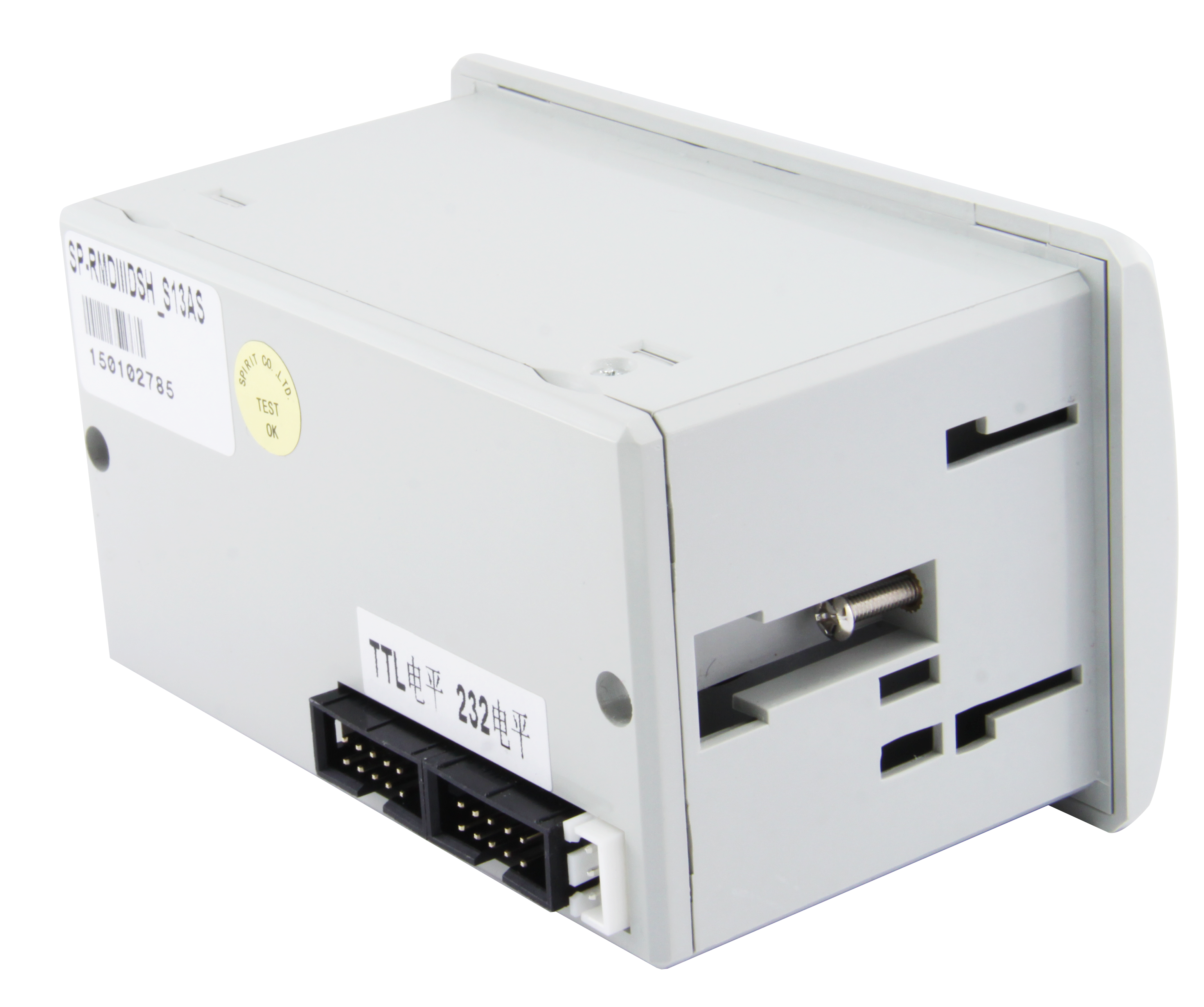
This differs greatly from standard standalone printers. A standard desktop unit includes an external power supply brick. It also features a bulky outer protective casing on the rear. A panel printer abandons these exterior plastics. It relies entirely on your host machine’s internal power supply. It uses your physical enclosure for environmental protection. You simply route power and data cables to the exposed rear pins.
It also differs fundamentally from bare printer mechanisms. Bare mechanisms offer no mounting front. They require extensive mechanical design work. You must design custom paper paths and tension springs. In contrast, this module includes a formatted bezel. It has an integrated paper-roll holder. It includes a pre-configured controller board. This level of integration drastically reduces engineering time for OEMs. You get a ready-to-use subsystem out of the box.
We must understand the core technology driving these devices. Direct thermal technology explains the complete absence of ink cartridges. These devices use a highly specialized thermal printhead. This printhead contains tightly packed microscopic heating elements. They line up along the print edge in high densities. Most standard industrial units offer a resolution of 203 dots per inch (DPI). You never need to replace ribbons or toner.
The printing process follows a highly precise mechanical sequence. We can break it down into three distinct steps:
Paper Feed: The internal stepper motor activates. It feeds thermochromic paper over the rotating platen roller. This specialized paper is coated with heat-sensitive chemicals.
Data Translation: The microcontroller receives input. It translates incoming data strings from the host machine. It rapidly triggers specific microscopic heating elements across the printhead array.
Chemical Reaction: The localized heat hits the paper instantly. It creates a rapid chemical reaction on the coated surface. The paper turns black to form crisp text, barcodes, or graphics.
Why does this matter for OEMs? This solid-state approach provides incredible mechanical reliability. You eliminate complex ribbon spools. You remove messy ink reservoirs. The internal design involves minimal moving parts. The primary failure points remain highly predictable. They are mostly limited to the mechanical wear of the gear train. The other major factor is the abrasive wear on the printhead itself. Standard printheads endure 50 kilometers of paper travel before failure. This structural simplicity ensures a high Mean Time Between Failures (MTBF). Using a Thermal Panel Printer guarantees stable operation across thousands of cycles.
Choosing the right size remains critical for successful product design. It directly impacts your physical housing constraints. It alters your internal power budgets. It strongly dictates the final user experience. Let us examine the two primary form factors used in industrial design.
This narrow size is best for tight spatial constraints. Engineers frequently use it for portable diagnostic equipment. You will find it commonly deployed in ticketing meters. It works perfectly for basic data logging tasks. You can fit it onto slim control panels easily.
It offers specific operational characteristics. It boasts significantly lower power consumption. It features a very shallow internal mounting depth. However, it is strictly suited for low-density information. You should only use it for short strings of text. It handles simple QR codes reasonably well. If your device outputs basic numerical readouts, this size is ideal. A 58mm Panel Printer keeps your hardware footprint extremely minimal.
This wider format dominates interactive user terminals. It is best for interactive self-service kiosks. Medical monitors use it for detailed graphical waveform readouts. Retail applications rely heavily on this wider format to display line-item details. You see them frequently in automated parking payment stations.
These units demand different integration characteristics from your host hardware. The wider format requires a noticeably larger physical panel cutout. It needs a higher peak current to drive the wider thermal printhead. It easily accommodates complex receipt formatting. It prints wider barcodes without scanning issues. It fits essential regulatory compliance text onto a single horizontal line. An 80mm Panel Printer delivers desktop-level receipt clarity within an embedded module.
Comparison Chart: 58mm vs. 80mm Form Factors
Specification Metric | 58mm Form Factor | 80mm Form Factor |
|---|---|---|
Effective Print Width | 48mm | 72mm |
Typical Application | Handheld diagnostics, simple meters | Self-service kiosks, medical monitors |
Information Density | Low (basic text, simple QR) | High (waveforms, complex 2D barcodes) |
Power Draw (Peak) | Low to Moderate | High |
Physical Footprint | Compact, shallow depth | Larger chassis, deeper enclosure |
Different industries leverage these modules to solve highly unique challenges. You will find them embedded in devices across numerous sectors. We see three main categories dominating the market. We can explore how they integrate into these environments.
Medical & Diagnostic Devices: Clinical environments demand immediate data access. Autoclaves use them for instant sterilization cycle logging. Blood analyzers print patient metrics the moment tests finish. ECG machines require them for detailed graphical waveform output. These localized hard-copy readouts ensure strict compliance. They provide permanent patient records before data ever reaches a central server.
Industrial Control Panels: Factory floors present rugged operational challenges. Weighing scales rely on them for batch weight documentation. Fire alarm control panels use them for immediate event logging. Manufacturing line test-equipment utilizes them for logging detailed diagnostic data. Engineers need immediate paper trails during system calibrations.
Retail & Transportation: Public infrastructure demands extreme autonomy. Parking meters issue physical dashboard tickets constantly. Locker systems print access codes for temporary users. Ticketing kiosks handle thousands of transactions daily. These environments demand a zero-maintenance printing solution. A properly installed Panel Printer handles heavy public use flawlessly.
You must evaluate specific technical criteria before purchasing samples. Blindly selecting a module often leads to catastrophic redesigns later. We recommend checking these specific technical parameters against your host machine capabilities.
You must first evaluate interface and connectivity options. You need to map legacy versus modern communication protocols. Does your host board require TTL or RS232 serial communication? Many legacy industrial PLCs rely entirely on RS232. Alternatively, is USB preferred for plug-and-play driver support? Modern Android-based kiosks almost exclusively utilize USB interfaces. You must verify matching baud rates if utilizing serial connections.
You must rigorously assess the power requirements. You should check the required voltage range. Modules typically require 5V, 9V, 12V, or 24V DC input. Higher voltage generally equates to faster print speeds. It also produces much darker print quality. However, it requires careful power-supply budgeting. You must handle severe peak current spikes during dense print cycles. If your host power supply cannot handle a sudden 3-amp spike, the entire system might reboot.
You need to scrutinize the paper loading mechanism. You generally choose between an "easy-load" clamshell design and a traditional feed path. Clamshell front-access is highly critical for C-suite and end-user adoption. The entire front face hinges open, bringing the platen roller with it. It prevents severe paper jamming issues in the field. Users simply drop the paper roll in and shut the door.
You must verify Operating System support and command compatibility. You need availability of robust drivers for Windows, Linux, or Android. If you are developing bare-metal firmware, you need ESC/POS command compatibility. This allows for direct hexadecimal programming. It gives you raw control over line spacing and character sets.
Hardware Integration Evaluation Matrix
Evaluation Category | Key Questions for Engineers | Common Pitfalls to Avoid |
|---|---|---|
Connectivity | Do we need TTL, RS232, or USB data lines? | Mismatched serial baud rates causing garbled text. |
Power Budgeting | Can our host supply handle a sudden 2A-3A peak draw? | System reboots triggered by printhead heating spikes. |
Paper Handling | Who loads the paper? Trained techs or public users? | Using traditional feed for public kiosks (high jam risk). |
Software Logic | Are we using OS drivers or raw ESC/POS commands? | Assuming proprietary commands will work across brands. |
Integrating these modules involves navigating real-world physical constraints. You cannot simply drop them into a CAD file without planning. We must acknowledge specific environmental and mechanical realities.
You must account for thermal paper degradation. Direct thermal prints are highly sensitive to UV light. They degrade quickly under intense heat. They turn black when exposed to heavy chemical solvents. You cannot use this technology for archival documents intended to last decades. Standard receipts fade after a few years. If you need long-term archival stability, you must source highly specialized top-coated thermal paper. You must communicate this constraint to your end users clearly.
You need to respect strict mechanical tolerances. Miscalculating the mounting depth behind the panel causes severe headaches. The rear of the printer mechanism extends into your enclosure. It houses the motor casing and the PCB interface board. If you fail to leave clearance, it can lead to interference. The printer rear might crush internal cabling. It might short out against your host PCBs. You must measure the maximum paper roll diameter carefully. The paper roll housing requires significant internal spatial clearance.
You must evaluate strict environmental constraints. Standard units struggle in sub-zero environments. Freezing temperatures harden the rubber platen roller, causing feed slips. Areas with excessive moisture pose short-circuit risks to the exposed rear PCB pins. Unless the unit is specifically IP-rated, it remains vulnerable. You must house standard units behind environmentally sealed protective covers if deployed outdoors. You might need to apply conformal coating to the control board for humid environments.
Always request an accurate 3D STEP file from the manufacturer before cutting metal or ordering injection molds.
Isolate the printer's power circuit from sensitive analog measurement circuits to prevent electrical noise interference during printing.
Incorporate a physical "paper low" sensor window into your bezel design so users know when to replace the roll.
Ignoring the massive current spike required to print solid black graphics, leading to host power failure.
Designing the enclosure door so tightly that the clamshell mechanism cannot hinge open fully.
Failing to provide adequate ventilation around the internal stepper motor during continuous printing tasks.
Integrating a thermal panel printer drastically streamlines the development process for custom hardware. You combine the proven reliability of direct thermal technology with a drop-in, panel-ready form factor. You bypass the nightmare of designing custom mechanical paper paths. You eliminate the need to write raw motor-timing firmware from scratch. This approach protects your engineering timeline.
Engineers and product managers should finalize specific variables early. You must prioritize your paper width requirements immediately. Decide between 58mm and 80mm before starting any CAD work. You must secure adequate power availability for peak draws. You must prioritize front-loading accessibility before finalizing your hardware housing.
We advise you to contact the manufacturer early in your design phase. Request a physical development kit immediately. Ask for the official CAD models. You must test the physical mounting tolerances in your prototypes. You should rigorously test the software handshake protocols prior to mass production. Prototyping early prevents expensive tooling changes later.
A: No. They use direct thermal technology, which applies heat directly to chemically treated thermal paper to produce an image. You never need to replace ink cartridges or ribbons.
A: Lifespan is generally measured in printhead abrasion distance (often 50km to 100km of paper) and auto-cutter actuations (typically 500,000 to 1 million cuts), translating to several years of use in standard deployment.
A: Yes. Provided the controller board supports ESC/POS command sets, both 58mm and 80mm panel printers can render high-resolution 1D/2D barcodes, logos, and custom fonts. You can send bitmap images directly to the buffer.
A: Unlike desktop printers, panel printers draw power directly from the host machine's internal power supply, typically requiring a 5V, 9V, 12V, or 24V DC connection depending on the model and required print speed.


